
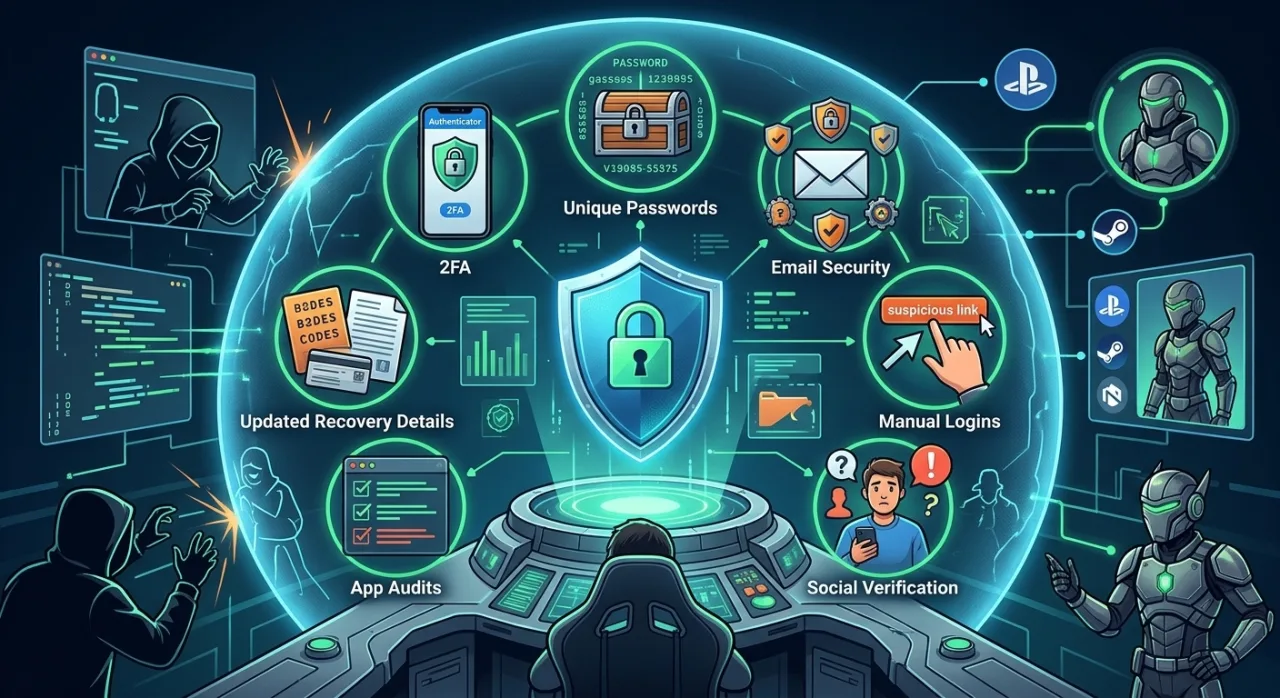
 Your gaming account carries significantly more value to a thief than your primary email address. Years of earned progress, rare cosmetics, linked payment methods, and a network of trusted friends make gaming profiles prime targets. Treating gaming account security with the same rigor as an online bank login protects both your digital assets and your personal identity.
The vast majority of account takeovers rely on simple exploit techniques rather than complex hacking. Adopting a few key security practices shuts down almost every attack without requiring specialized software or hardware.
Why Gaming Accounts Are Prime Targets
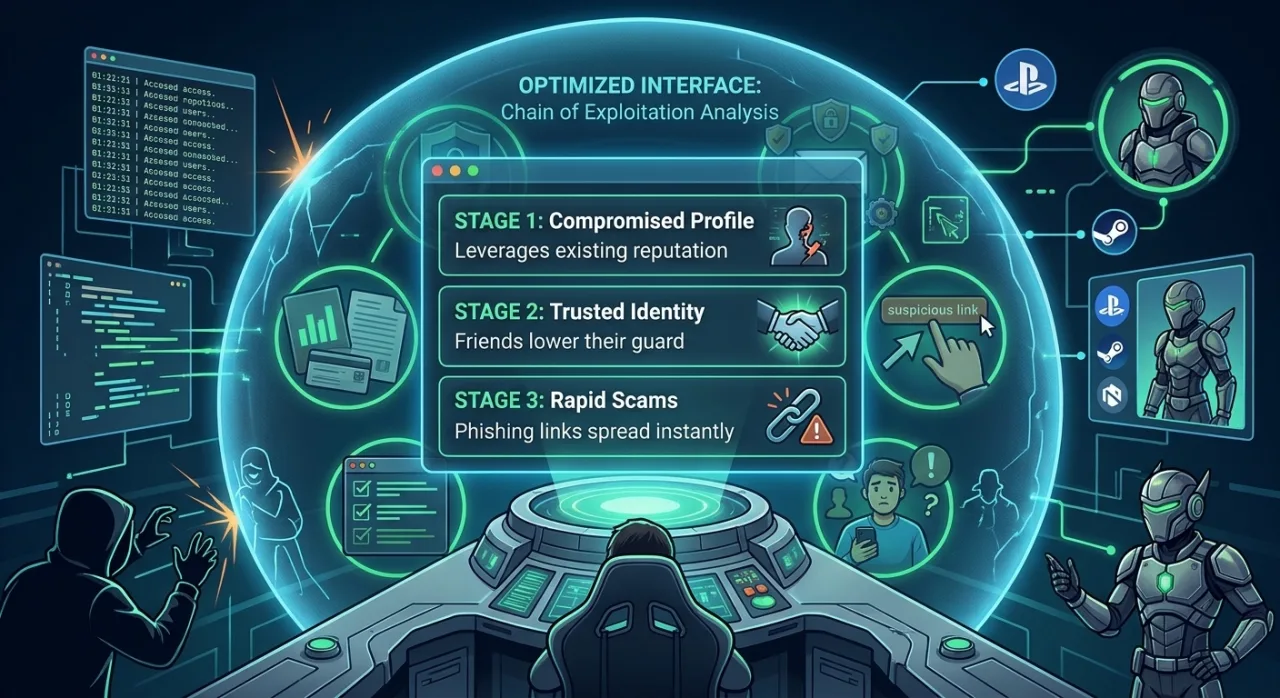
Attackers target gaming profiles because they yield high returns with low initial effort. Once compromised, accounts are stripped of tradeable inventory, resold on third-party marketplaces, or used to scam other players.
| Step Number | Chain Stage | What Happens | Security Impact |
| 01 | Compromised Profile | Attacker gains control of a legitimate account | Exploits built-up account reputation and trust |
| 02 | Trusted Identity | Messages originate from a known friend’s handle | Network contacts lower their defense and guard |
| 03 | Rapid Scams | Phishing links or malicious files are distributed | Scams spread rapidly across entire friends lists |
Gamers face unique security threats due to three main vulnerabilities:
-
Lowered Guard: Many players treat security as an unnecessary chore because “it’s just a game,” reusing passwords across community forums, launchers, and personal accounts.
-
Psychological Exploitation: Attackers deploy targeted bait—such as free skin offers, beta access keys, account boosting, or competitive gameplay clips—that directly target player interests.
-
Social Graph Access: A hijacked profile grants immediate trust. Friends naturally lower their guard when receiving direct messages or links from a familiar handle.
The 7 Essential Security Habits
These practical routines require zero technical expertise, but they form a robust defense against digital identity theft.
| Security Layer | High-Risk Habit | Secure Practice | Defense Level |
| Authentication | Passwords only or SMS verification | App-based 2FA (e.g., Authenticator apps) | Maximum |
| Password Mgmt | Reusing passwords across launchers | Unique passwords stored in a manager | High |
| Email Defense | Neglecting the underlying inbox | Dedicated email with strict 2FA | Maximum |
| Navigation | Clicking direct login links in messages | Navigating manually or using bookmarks | High |
| Social Verification | Trusting direct messages immediately | Out-of-band identity checks | Medium |
| App Permissions | Unlimited third-party app access | Regular permission audits and revocations | Medium |
| Account Recovery | Outdated phone numbers and emails | Offline backup codes and saved receipts | High |
1. Enable Two-Factor Authentication (2FA) Everywhere
Enabling two-factor authentication guarantees that a stolen password alone cannot grant account access. Always select an authenticator app (such as Google Authenticator or Authy) over SMS. Phone numbers remain vulnerable to SIM-swapping attacks. Apply this protection to:
-
All major game platforms and launchers.
-
Individual game publisher accounts.
-
The recovery email address linked to your gaming profiles.
2. Generate Unique Passwords for Every Service
Password reuse turns a single breach on an obscure fan forum into a full takeover of your primary game accounts. Credential stuffing scripts automatically test leaked username and password combinations across major services within minutes of a data dump. Utilize a password manager to generate, store, and auto-fill complex strings for every service.
3. Fortify the Email Account Behind Your Profile
Your email address is the master key to your digital footprint. Anyone controlling your inbox can reset passwords for every connected platform. Secure this primary vector with a long, unique passphrase and mandatory two-factor authentication.
4. Never Log In Through External Links
Deceptive login forms look identical to official landing pages. Establish an absolute rule: never type login credentials after clicking a link in a message, email, or forum post. Always open official client apps directly or access verified bookmarks from your web browser.
5. Verify Uncharacteristic Friend Requests
When a friend suddenly sends an unsolicited message asking you to vote for their esports team, test a new indie game build, or redeem a free gift code, pause immediately.
Red Flag Alert: Hijacked profiles frequently send automated phishing messages. Watch for rushed phrasing, unusual formality, or high-pressure requests to click a link. Verify their identity via an alternative channel (such as a voice call or secondary chat app) before taking action.
6. Audit Third-Party App Permissions
Overlays, stat trackers, mod managers, and trading platforms often request permission to read your profile data. Limit connections to tools you actively use and completely trust. Every three months, navigate to your account privacy settings and revoke access for inactive or unfamiliar applications.
7. Maintain Updated Recovery Details
An abandoned recovery email or outdated phone number locks you out permanently when an incident occurs. Update contact information immediately whenever changes occur, and save offline backup codes in a encrypted vault or physical notebook.
Immediate Steps to Take If Your Account Is Compromised
Act quickly to limit damage if you detect suspicious login alerts, missing items, or unauthorized messages sent from your profile:
-
Secure Email First: Change the password on your primary email address immediately, then reset your gaming account password.
-
Terminate Sessions: Navigate to account security settings and select “Sign Out of All Active Sessions.”
-
Revoke Connections: Remove all unknown authorized applications, linked social media profiles, and unrecognized hardware devices.
-
Contact Support: Submit a ticket through the official, verified support portal. Avoid following support links provided by third parties.
-
Notify Contacts: Warn your friends via external platforms to ignore links or messages sent from your handle during the compromise period.
Essential Account Recovery Checklist
Complete these preventive steps today to streamline future support requests:
-
[ ] Confirm primary email address accessibility.
-
[ ] Update active mobile phone numbers.
-
[ ] Generate and store physical/offline backup codes.
-
[ ] Save digital purchase receipts and transaction ID records.
-
[ ] Note down key registration details (e.g., account creation date, initial ISP).
Frequently Asked Questions
How do gaming accounts get hacked?
Most compromises stem from phishing pages, credential stuffing using leaked passwords from external breaches, or malware disguised as game mods and cheats. Direct account hacking is extremely rare compared to social engineering and automated credential testing.
Is SMS two-factor authentication sufficient?
While SMS authentication offers better security than relying on a password alone, app-based authenticators provide superior defense. Attackers can hijack phone numbers through carrier social engineering (SIM swapping) or intercept SMS messages.
Can stolen in-game items be restored?
Restoration depends on platform policy. Many major platforms restore items or rollback inventories if the incident is reported quickly with clear proof of ownership. However, because policies vary and processing takes time, prevention remains the most reliable strategy.
Adopting these seven habits requires only a few minutes of setup, eliminating the hassle and downtime of recovering a stolen account. Maintain complete control over your digital assets by locking down your credentials today.
Leave a Reply